
Every real estate listing photo, every product shot, every social media graphic eventually hits the same wall: the background needs to go, and the image needs to look sharp at a larger size. For years, the fastest fix has meant uploading to a cloud service, watching a progress bar, and either paying per image or bumping into a monthly cap.
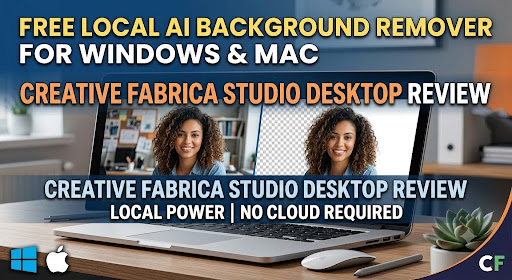
Creative Fabrica just released something aimed squarely at that annoyance: Creative Fabrica Studio Desktop, a free app for Windows and Mac that runs AI background removal, upscaling, image generation, and text-to-speech locally on your own machine. I installed it and tested it against a real editing task to see if it holds up.
The Trouble With Cloud-Based Editing Tools
Browser-based background removers and upscalers are convenient in theory, but in daily use they tend to introduce the same set of annoyances:
- One image at a time, uploaded and processed individually
- Free tiers that run out well before a full batch is done
- Noticeably slower performance on a weak or shared connection
- Client files or unreleased listings sitting on someone else’s server
None of these are dealbreakers on their own, but for anyone editing images regularly agents, photographers, small shop owners they add up into a workflow that feels heavier than it should. That’s the specific problem this app is trying to solve.
A Closer Look at Creative Fabrica Studio Desktop
At its core, this is a desktop application that brings the Creative Fabrica Studio toolset together with AI models you install directly on your computer. Once a model is in place, tools such as background removal and image upscaling run on your hardware rather than routing through a remote server.
It’s worth being upfront about the limits here: the app doesn’t claim every feature works offline indefinitely, and some functions may still check in with your Creative Fabrica account. That said, the two flagship tools background removal and upscaling do process locally after setup, which is really the headline feature.
Getting it running takes a few minutes: download the installer that matches your OS, open it, and follow the setup steps to pull down the local AI models. Windows may flag the installer with a security warning during this step. That’s standard behavior for a newer app that hasn’t built up a wide distribution yet, select “More info,” then “Run anyway,” and setup proceeds as normal.
The Case for Local Processing
The advantage of keeping this work on your own machine becomes clear pretty fast:
- Your files stay put. Nothing needs to be uploaded to remove a background or upscale an image.
- No metered usage. Once the model is installed, there’s no ongoing credit cost for the local tools.
- Connection-independent. A slow or spotty internet connection doesn’t slow down local processing.
- More privacy for sensitive work. Off-market listings or unannounced products aren’t passing through outside servers.
- One workflow, not several apps. It’s built into the existing Creative Fabrica Studio, not a separate standalone tool to manage.
For anyone processing more than a handful of images in a normal week, that mix of free, local, and unlimited is hard to find elsewhere.
Testing It on an Actual Listing Photo
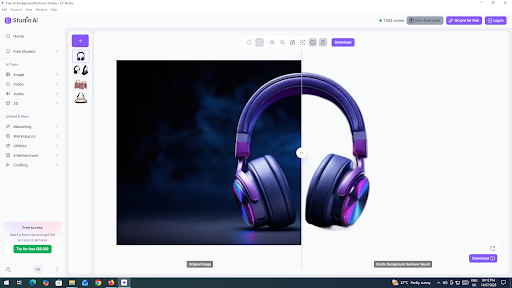
Rather than take the marketing at face value, I ran a real property-style photo through the software to see how it performed.
The process went like this:
- Opened Creative Fabrica Studio Desktop and selected the local background removal tool.
- Loaded a photo taken against a busy, uneven background.
- Let the local model do the processing no upload bar, no waiting behind a server queue.
- Exported a clean transparent file ready to drop into a listing or marketing graphic.
I also ran a smaller image through the upscaler to see how it handled prepping something for a larger printed flyer, which is a common need for anyone producing marketing materials. The result held up well at the larger size, and again, the whole process stayed on my machine.
Who Should Actually Consider This App?
Based on what it delivers, it’s a good fit if you’re:
- A real estate agent or photographer who edits listing photos regularly
- A small business owner producing your own marketing graphics
- A designer preparing images for print at a larger size
- Someone handling client photos who’d prefer they don’t touch a cloud server
- Anyone tired of hitting free-tier limits on browser-based editing tools
Weighing the Pros Against the Limitations
On the plus side:
- No cost and no credit card needed for the core tools
- Runs on both Windows and Mac
- Local background removal and upscaling means faster turnaround and more privacy
- Built directly into the Creative Fabrica Studio toolset
- No per-image charges once the local models are set up
Where it’s less convincing:
- Older or lower-spec computers will process images more slowly
- The initial model download adds some setup time before first use
- A few features may still require an internet connection or account login
- As a fairly new release, some rough edges are still expected
Weighed against paying by the credit on cloud-only tools, these trade-offs are reasonable for most regular users.
Common Questions About Creative Fabrica Studio Desktop
Does this app cost anything?
No. The core tools background removal, upscaling, image generation, and text-to-speech are free with no card required.
Is background removal really processed on my computer?
Yes, once the local model is downloaded, it runs directly on your machine instead of uploading to the cloud.
Is there a version for Windows?
Yes. Expect a one-time security prompt on install, which is normal for a newer app.
What about Mac users?
There’s a dedicated Mac build available as well.
Can this help with real estate listing photos?
Yes, it’s well suited to cleaning up backgrounds on property and listing images.
Is it useful for preparing images for print?
Yes, the upscaler is aimed at exactly that bringing lower-resolution images up to a print-ready size.
Does it produce transparent PNG files?
Yes, exports from the background remover come out as transparent PNGs.
Can this replace a cloud-based background remover?
For the local tools specifically, yes you no longer need to upload images elsewhere for basic removal and upscaling work.
Will I need internet access to use it?
You’ll need one to install the app and download the models. After that, local tools can run without a steady connection, though some account features may still require one.
Are my photos sent anywhere during editing?
For the local tools, no processing happens entirely on your own device.
Bottom Line
If upload queues and credit limits have been slowing down your photo editing, Creative Fabrica Studio Desktop is worth trying, particularly since there’s no cost involved. It won’t replace every cloud tool out there, but for background removal and upscaling two of the most common edits in any image-heavy workflow a free, local, unlimited option is a genuinely practical upgrade to have on hand. Download the free local background remover and upscaler and see how it fits into your own editing routine.